Showing posts with label custom software solutions. Show all posts

Guide to Choosing the Right Custom Software Development Partner

 Guide to Choosing the Right Custom Software   Development Partner

Choosing a software development company to create a custom solution can be challenging. Determining the right candidate requires planning, preparation, and knowing what questions to ask and what to look for in a developer.

custom software company


Commercially available software may be suitable for a company in its infancy, but gaps between what your business truly needs and what the canned software delivers can hamper productivity over time. When this occurs, it may be time to consider exploring the services of custom software development companies to develop tailored solutions designed with your particular needs in mind. For many companies beyond the startup stage, custom software development may be necessary for continued growth.

Tailor-made software becomes a better option than struggling with the limitations and drawbacks of off-the-shelf solutions. The ultimate goal is to improve operational efficiency and optimize how you invest your technology budget. Knowing when to choose custom versus off-the-shelf is essential to the health and success of your organization.

The decision can’t be made lightly, but it also cannot be postponed for long — relying on generalized commercial software solutions can create and exacerbate inefficiencies, slow down your workflow, and negatively impact your bottom line.

Choosing the right custom software development company isn’t a trivial or easy task. Because so many rides on the decision, knowing how to pick the right custom developer is critical. Here are some things to consider.

Define Goals for Your Custom Software Solution

Pursuing a custom software solution requires compiling a list of essential features and performance criteria for the desired custom-developed solution. These requirements will help your organization search for, validate, and select the right custom software development companies to work with.

Determine what functions you need, required workflows and other business processes, and data management demands. Define objectives not just by considering the conditions of the moment but what you might require in the future, and anticipate areas in which a custom-developed software solution could help you grow. Well-defined goals will also help you choose the right developer.

Data Security and Regulatory Compliance

Any software that handles customer data — especially personal information such as financial or medical information — needs to be secure. When considering custom software development companies, ask if they have expertise with secure development practices like version control, code integrity management, encryption, role-based access, vulnerability testing, and system hardening — in short, make sure they can deliver solutions that keep your data safe.

Cybercriminals don’t just target large banks: 58% of losses due to cybercrime occurred to small and mid-sized businesses in 2021. Of those targeted, more than 80% were attacked a second time — usually through vulnerabilities in software.

Cybercrime isn’t the only concern. Ensuring the custom software development companies you’re considering can keep your data secure mitigates potential noncompliance or regulatory breach that could expose your company to fines or legal action.

The custom software development companies you are considering should be able to guarantee a final product that is compliant with any regulations that apply to your specific business, for instance, anti-money laundering (AML), and know your customer (KYC) requirements for the handling of transactions or financial data.

The Right Development Technology and QA Testing

Determining which software development technology might be the best choice for your custom project can be an excellent way to narrow your selection. When interviewing custom software development companies, explain the scope and objective of your project and ask for development technology recommendations. You want to be sure the development company you choose uses the best technology for the project and your operating environment — not just the one they’re most comfortable with.

Inquire about testing systems and procedures. A good testing regimen helps developers identify problems and fix them quickly, making for a faster development process. Adequate testing also ensures the risk of bugs in the final product is kept to a minimum — and any that arise can be dealt with quickly.

Examine the Development Process and Developer Portfolios and Check References

Technical expertise is essential, but so are “soft skills” like communication. Ensure a developer understands what you’re looking for and can describe the solution they propose to make it clear they know what you need.

Ask about their internal processes as well. Inquire about their project management systems and the kind of communication and oversight provided by their development procedures.

Look into the portfolios of candidate custom software development companies and review their clients and projects. Learning the kind of organizations they’ve worked with and what type of custom software solutions they were able to provide can help you determine if the developer is a good fit for your needs. And ask for and talk to references — ask about what went well and what didn’t. 

Bear in mind matters of scope and scale. Make sure the custom software development companies you’re considering have the capabilities and track record to handle a project of your size in the timeline you need it delivered.

Compare Contracts

Lastly, you’ll need to compare proposed contracts and bids. Though some custom software development companies or individual freelancers might offer deep discounts with the promise that they can handle your project successfully, many of them may not be up to the job. Low bidders may be overlooking potential complications or may cut corners. Experience is important.

When reviewing contracts, ensure your custom software project is detailed to your satisfaction. The functions and features of the software and delivery milestones should be clearly described. Contract terms and pricing information should be clear and accurate. Things you’ll want to see included in a contract are a statement of work, proposed timelines, and intellectual property rights details. Also, pay special attention to warranties and information related to after-development support and bug fixes.

Custom Developed Solutions for Continued Growth

Whether your custom software solution succeeds or fails in solving the problems it intends to address depends mainly on the chosen custom software development partner.

Choosing a custom software development company with experience, skills, and development expertise is essential to ensure your project meets your needs.

Contact us to learn more about how Aezion can help you reach your custom software development goals.


App trends in AI, Machine learning, Security and Policy in 2023

 App trends in AI, Machine learning, Security, and Policy 

The application of AI, machine learning, and custom software development is rapidly changing the way businesses operate. With the help of these technologies, companies can now create applications that are tailored to their specific needs. This allows them to remain competitive and stay ahead of their competitors.

AI, machine learning and custom software development can also help businesses in terms of security and policy. By using these technologies, companies can develop applications that are secure and compliant with existing regulations. This helps them protect their data from potential threats while ensuring that they are following all applicable laws and regulations.

Custom App Development


AI, Machine Learning, and Security are some of the hottest topics in the tech world today. With the rapid advancements in these fields, custom software development companies are now able to create applications that can provide more efficient solutions for businesses.

The use of AI, Machine Learning, and Security has been growing steadily over the last few years and this trend is expected to continue in 2023. This article will discuss the various app trends in these fields and how they can help businesses improve their operations. We will also look at some of the security policies that need to be implemented to ensure data safety and privacy.

AI and machine learning are quickly becoming a major focus for custom software development. With the rise of AI and machine learning, security, and policy have become increasingly important. Companies are now looking for ways to make sure their data is secure and that their policies are up-to-date with the latest technology trends.

This article will look at the current app trends in AI, machine learning, security, and policy. We will discuss how these technologies are being used in custom software development, as well as how they can be used to ensure that companies remain compliant with applicable regulations. We will also explore some of the potential use cases for AI and machine learning in custom software development projects.

What is postman API testing?

 Postman API Testing

API testing is a process of executing the API to see if it behaves as expected. API testing is a part of custom software development, and it can be done manually or with the help of automated tools such as Postman.

Postman is an API testing tool that allows its users to send HTTP requests, inspect responses and generate test data. Postman can be used for both manual and automated API testing. It also provides features that allow developers to create their own APIs without any coding knowledge which makes it a great tool for beginners.

Postman Collections


In this blog post, we will discuss the importance of API testing and how it can be done in a quick and easy way.

API testing is the process of checking if an application is able to communicate with a server or another application. It is also used for catching errors in the code or bugs before they are deployed to production.

There are many ways to test APIs, but most developers use Postman - a powerful tool for testing RESTful APIs.

Postman API testing is a type of software testing that helps developers to use APIs and build applications.

Postman API testing can be done by checking the HTTP requests and responses, which are sent and received by an application.

custom software development services for better ROI

 Custom software development services can be expensive and time-consuming. However, if you are willing to invest in it, it can provide a better ROI and make your business more competitive.

Custom software development services are a great way to make your business more competitive, but they can be expensive and time-consuming. Fortunately, there are ways to mitigate the cost of custom software development by using an experienced developer or outsourcing the job to a company that specializes in this field.

Custom Software Development Services


Custom software development is the process of developing a software product for a particular customer. This process is often outsourced to third-party service providers. Custom software development services are a good investment for companies that want to improve their ROI (return on investment).

Custom software development services are an integral part of today's business environment. With the help of these services, companies can simplify their operations and increase their ROI. In this article, we will discuss the benefits and challenges of custom software development services in detail.

Custom software development is a process where a company creates a custom-made application for its own use or for clients to use in order to achieve certain goals. Custom software has been around since the 1950s, but it has only recently started to gain traction as technology has advanced. It is important to note that not all custom-made applications are considered "custom software."

In this article, we will be focusing on custom software development services that involve the creation of new applications from scratch rather than just modifying an existing one, or installing an app from a store like Apple's App Store or Google Play Store.

To get started with any kind of custom-software project, it is important for companies to have a clear understanding


Which should Choose my Business Custom Software or SaaS

Custom software and SaaS are both good for different reasons. For example, if your company has a specific need then you should use custom software development. However, if you have a smaller budget or want to focus on your core business then you should use SaaS.

Custom software is the best option when it comes to developing a new product or service. It is also better for companies that have specific needs and can't find the right solution in an existing product. On the other hand, SaaS is more affordable than custom software because it's already been developed by someone else and can be used by any company with a small budget.

Custom Software Development


Custom software development is a more expensive way to develop software. It takes time and money to create, but the benefits are that it can be tailored to the needs of your business and it can be updated quickly if needed.

SaaS has a monthly fee, but it is much cheaper than custom software development. The downside is that you are stuck with the features that the SaaS company offers and you don't have any control over how it works or what updates are made.

Custom software is often more expensive and time-consuming to develop than SaaS. However, custom software is better for businesses that need a unique functionality or have a specific business process.

Businesses that use SaaS should be cautious as they are at risk of being left behind if the vendor stops providing the service.

Custom software is more expensive than SaaS. It is also a lot more difficult to manage and maintain.

SaaS is cheaper and easier to use, but you are limited in the features that you can use.

The best solution for your business should depend on what your needs are for the type of software that you need.

Custom Software Development

Reasons Why Business Needs Custom Software Development

Custom development is the best option for your business because it offers the best of both worlds - speed and agility. You get to work with a team of experts who are committed to your project, and you don't have to worry about the cost because you only pay for what you need.

The custom software development process starts with a discovery phase. This is when we find out what it is that your business needs. The second step is designing, where we create mockups for your product that are relevant to your industry. 

 A business needs Custom Software Development for various reasons, such as:

 *  To enhance the efficiency of the workflow process

 *  To automate repetitive tasks

 *  To improve customer service

Custom software development is the process of developing software that meets the needs of a business. It is usually created for a specific company or organization, and it can be customized to meet their needs.

Benefits of Custom Software Development


There are many reasons why custom software development is needed. The first one is that it’s not always possible to find off-the-shelf solutions that have all the features you need. Secondly, in some cases, it will be cheaper to develop your own software rather than purchase an off-the-shelf solution that may not meet your requirements fully. Finally, many businesses want to keep their data private and this can only be done if they develop their own custom software.

Custom software development is a process that involves the design, development, and implementation of a software solution tailored to the needs of an individual or organization.

There are many benefits of custom software development for businesses. It helps them to save time and money by avoiding the need to purchase an off-the-shelf software that may not be able to meet their requirements.

How to improve your Custom Software workflow performance

How to improve your Custom Software workflow performance 

Custom software solutions can improve your workflow performance. They have a variety of features that can help you be more productive and reduce the time spent on menial tasks.

Some of the features you should look for when purchasing a software solution are robust data storage, integration with other applications, customizable workflows, and reports.

Custom Software Solutions


Importance of Custom Software

A good workflow is a key to a successful business. It’s an important part of the process that helps you avoid duplicating work and wasting time. But what if your workflow isn’t working for you What if it needs to be customized.

There are a lot of software solutions that are designed to improve workflow performance. Some of them are more effective than others, so it is important to research which ones work the best for the specific needs.

Software solutions can be purchased and installed on one’s personal computer, or they can be accessed through an online service. The following are some examples of custom software solutions that have been designed specifically for writers:

In this article, we will explore how custom software solutions can improve your workflow performance.


Why People Leave Your Website Early

 Why people are leaving your Web site

When people visit your website, they will either leave or stay. It is important to understand the reasons why people are leaving your website and the ways you can improve your site to keep them on it.

Custom web development


Some of the main reasons for people leaving your site include:

- Dislike of design

- Lack of information

- Too many ads

- Slow load time

- Unclear navigation

Website development is a process that can be divided into 4 steps: Planning, Designing, Development, and Maintenance.

The Planning stage includes the process of analyzing the needs of the website and its users. This will help define what features are needed in order to satisfy those needs. The Designing stage will determine how the features should work and what information should be displayed on the website. The Development stage is where all of these ideas translate into a working website, while the Maintenance stage is where any updates or changes to the website are made.

The most important part of a successful website is to make sure that it meets your users’ needs in an efficient way.

Websites are the most important tool for a company to make sure that it can reach its target audience. But what if people leave your website? The answer is simple: they will not be able to find the information they are looking for and will not convert into a customer.

There are many reasons why people leave your website. Some of them include:

- Poor design

- Too many ads

- Slow loading time

- Lack of content

-Your navigation structure is unclear

-Your site isn't responsive  

contact us for creating a responsive custom web development


Best CSS frameworks for the Responsive site

CSS frameworks for the Responsive Website   

One of the most popular and used web design tools is CSS, which powers the design and layout of a website. CSS frameworks are an important resource for web developers as they can be used to make designing websites easier.

The five best CSS frameworks for 2022 are Bootliquor, The Grid System, UIkit, Foundation, and SemanticUI.

Best CSS frameworks for the Responsive site


Bootliquor: Bootliquor is a lightweight framework that provides tools to create responsive grid layouts and RTL language support for Arabic and Hebrew languages. The Grid System: This framework focuses on making it easier to design websites with templates that can be easily rearranged with drag-and-drop functionality. UIkit: Uikit is another responsive grid system that offers hundreds of pre-made templates as well as the ability

One of the best ways to learn web development is to use a framework. Frameworks make it easy for developers to create and build websites and templates without writing every line of code from scratch.

The following is a list of the best CSS frameworks that we can use in 2022:

1. Bootstrap:

Bootstrap has been the most popular Bootstrap CSS framework for years now and its usage still continues to grow with time. With Bootstrap, developers can design responsive layouts and design interactive pages with ease.

2. Foundation:

The Foundation is another popular CSS framework for web development that has been around since 2009 and it is an open-source project which means you’ll find plenty of tutorials on how to use it online if needed. It offers lots of features such as grid

In this article, we will be listing the top best CSS frameworks.

If you’ve been following the trends in web design, you know that CSS frameworks are a very popular way of speeding up the development process. These frameworks make it easier for designers to make their layouts more responsive and adaptable to any screen size at a very low cost. The best CSS framework for designers depends a lot on what they need and their preferred styles of coding. Here are some of the most popular and widely used CSS frameworks which may be worth looking into:

Bootstrap: The most popular HTML, CSS, and JavaScript framework in the world, with over 18% market share among all such products. It offers a wide variety of features designed to help developers create responsive websites quickly without requiring.

Contact Us Today:

Contact Aezion for best-in-class custom application development and services. Custom software, mobile apps, business intelligence… 100% in-house team!


The Benefits of Web-Based Systems for Business

Web-based applications used to be very limited in functionality. However, advances in technology, security, and internet speeds have greatly increased the potential scope of web-based systems.  Today, we have web-based business accounting systems, web-based CRM systems, a web-based Microsoft Office, and more. Web-based applications offer some significant advantages over native, client-based software. Here are just some of the benefits of web-based apps for business.
Web-Based System for Business


What is a Web-Based System?

A web-based system is an application that is accessed via HTTP. The term web-based is usually used to describe applications that run in a web browser. It can, though, also be used to describe applications that have a very small component of the solution loaded on the client PC. The host server for a web-based system could be a local server, or it could be accessed via the internet.

Lower Development Costs

A web-based application runs in a web browser. That means that a single, responsive web application can be used across multiple device types. Although web apps will need to be tested on different browsers, there is no need to test them on different operating systems. This makes development and testing much easier. It cuts development costs and reduces development time.

Easy Installation and Maintenance

Unlike traditional software that is loaded on each device, web applications run from a host server. There is no installation on local machines. Software upgrades are all completed centrally. That reduces the costs of installing and upgrading software. It also ensures that all users are always using the same version of the software.

Accessible Anywhere

Users can access a web-based system anywhere. So long as they have an internet connection, a web browser, and the appropriate login details. This means that users can access the data they need when they are away from the office. It also brings the possibility of staff working from home.

Easy Data Sharing and Collaboration

The sharing of data and collaborating on projects is made much easier with web-based systems. Data is stored in one central location, so users can share data and work together on projects. It is also easier to integrate web-based systems than isolated desktop applications.

Centralized Security

As web apps are installed on web servers, security is controlled by an IT professional. That avoids sensitive corporate information being held on many local client PCs, which are not as secure. Employees can access data when they are away from the office via a web application. So, it is not necessary for data to be held anywhere other than the secure central location.

Reduced Hardware Costs

Web-based systems can eliminate the need for powerful client PCs. Processing is carried out on the host server. The host server can be engineered to efficiently service simultaneous, peak demand. So, the storage, processor, and memory requirements for client PCs can be reduced. Taken across an entire organization, this can represent a large cost saving for some businesses.

Increased Efficiency

In most businesses, the deployment of web-based solutions leads to the streamlining of business processes. Often, paper-based processes can be replaced by workflow-based solutions. The business process improvements can lead to higher employee productivity and lower costs.

Adaptable to Changing Workloads

The deployment of web-based applications requires no software loading on the client PC. All that is needed is the setting up of a new user and the relevant secure access controls. This can be a major benefit for growing businesses, or for seasonal businesses. Users can be added or removed very quickly.

Greater Availability of Information

Web-based systems make it easier to provide access to real-time information. The paper reports that might take days to prepare and distribute can be replaced on online reports and digital dashboards. That can improve the quality and the speed of decision-making, right across an organization.
Custom application development can provide businesses with significant cost savings and productivity improvements. Now that internet access is almost universally available and internet speeds have significantly improved, applications that previously had to be client-based can now be deployed on the web.
Although this is the case in developed Western countries, it is not the case worldwide. In some countries, internet access is unreliable. So, the major deployment of web-based applications may still not be possible. International organizations with overseas offices may not yet be able to take full advantage of web-based solutions.

For domestic organizations, though, web-based systems have a promising future. From web-based office applications, like content management systems and productivity applications, to custom web-based software developed specifically for your organization, the foundation of many future software solutions is likely to be web-based.

Customer relationship management for Higher Revenues

 In today’s fast-paced, ever-evolving business landscape, remaining complacent is not an option. The more information you have on your audience in the form of customer data, the better equipped you’ll be to beat your competitors and offer better products and services. One of the most valuable types of enterprise data is the relationships and interactions that you have with your customers and prospective customers—a concept summarized as customer relationship management and associated with the snappy acronym “CRM.” So what is CRM exactly and what are the benefits of CRM for your business?

Customer relationship management


What Is Customer Relationship Management (CRM)?

Customer relationship management is a catchall term for the various processes and systems that businesses use to manage their interactions and relationships with their customers and prospects.

Breaking down this term into its three constituent parts, you get:

  • Customers: Your existing user base, as well as any prospects and leads in your sales pipeline.
  • Relationships: The sum total of all your company’s interactions with a customer or lead. This includes many different channels: phone calls, emails, letters, social media, website visits, etc. Sales, marketing and customer support are the three departments most responsible for cultivating customer relationships, but customers may have contact with other parts of your organization as well.
  • Management: The tools, processes, and workflows that help your business stay on top of your customer relationships.

The term “CRM” is also used as shorthand for software platforms and systems that help businesses perform customer relationship management. Examples of popular CRM software include Salesforce, HubSpot CRM, Pipedrive, Zoho CRM, Oracle CRM, and Microsoft Dynamics CRM.

What Are the Benefits of CRM Systems?

By automating and standardizing your customer interactions, CRM systems can offer a great number of benefits to your business. The best systems come with a wide range of features and functionality to support critical business activities such as:

  • Sales enablement: CRM platforms can help your sales team identify the most promising leads and achieve more accurate sales attribution (i.e. determining which content or channels are the most effective at converting prospects).
  • Marketing automation: With the right CRM system, you can automate a large portion of your marketing workflow, from generating new leads to delivering content for different audiences and segments.
  • Data analytics: CRM software can perform analytics and generate reports on the customer interaction data you store. The insights gleaned from these analyses can help you uncover hidden opportunities or identify areas of improvement.
  • Data integration: Some CRM systems can perform customer data integration with other files, databases, and sources. The CRM platform can then serve as a “single source of truth” for your customer data and export it to other systems and locations.

These features and functionality can dramatically enhance your business processes and workflows. The potential improvements offered by CRM software include:

  • A better understanding of your customers: For one, CRM systems help keep track of all your customers’ salient contact data and demographic information: phone numbers, email addresses, job titles, birthdays, etc. CRM data can also offer insights into the behaviors, opinions, and beliefs of your customers and prospects.
  • Improved customer segmentation: As a corollary, understanding your customers better also helps you separate them into valuable segments and audiences for better-targeted marketing.
  • Higher customer retention rates: By keeping track of all customer interactions, CRM software helps you identify and retain disgruntled customers, or help bring back old customers into the fold (e.g. people who haven’t made a purchase recently).

According to a study by McKinsey & Company, businesses that are “intensive users” of customer analytics are more likely to be successful in multiple domains. For example, these businesses are 23 times more likely to excel at acquiring new customers and 19 times more likely to be highly profitable.

How Aezion Can Help with Customer Relationship Management

Customer relationship management is one of the most essential functions of any organization, giving you a window into what your customers think about your business. While off-the-shelf solutions can get you going, many businesses soon find that a more customized CRM or integration with other essential systems is what they need to move their business forward.

Aezion is ready to help. We’re passionate about helping our clients solve their trickiest software development challenges. If you’re in the market for a new CRM solution or exploring how to improve your existing system, we can be with you every step of the way—from roadmaps and strategic planning to development, integration, deployment, and ongoing support and maintenance.

Natural Language Processing – What it is and why it’s important

Introduction

Natural Language Processing — the application of software systems to examining, interpreting and accurately responding to speech is viewed as the next big leap in user interface technology. However, human speech is far more complex than most people realize. There are rules, such as spelling and grammar. How we interpret speech and text, though, is far less well-defined. How do you know when a person is being sarcastic, for example? How do we know that an athlete’s explosive sprint to the finish line didn’t involve any pyrotechnics? In human language, the words can say one thing, but the context and the tone make those words mean something else.
It takes humans a half a lifetime to learn the subtle nuances of language. Even then, there will be words and phrases that some of us don’t understand. Then, there are further complications in understanding language, such as dialects and colloquialisms. So, how can a computer that “thinks” in binary be programmed, line by line, to become fluent in any language? The answer is; it can’t. But, thanks to the advent of artificial intelligence (AI), a computer can now learn how to understand a language.

What Is Natural Language Processing?

Natural language processing (NLP) is a branch of AI. NLP relates to humans and computers communicating using natural language. NLP includes both speech recognition and reading text. Using machine learning, a computer is now able to learn how to understand our speech and writing. Computers can now look at more than the keywords to decipher our language. It can pick up on the more subtle aspects of our language to interpret the contextual meaning of the words.

Why is Natural Language Processing So Important?

In the past, computers could only work with structured languages. The language had to be precise and unambiguous. To program a computer to perform any task, you had to give it clear instructions. You could only use the limited number of commands that the computer understood. The syntax had to be perfect as well.
Even an end-user of a computer program needs to give the computer precise commands. Those who are old enough will remember that to use a PC you once had to know the common MS-DOS commands. That barrier was overcome, to a degree, with graphical user interfaces, such as Windows. Now, we can point to a file with a mouse, instead of having to know the name of the file.
NLP promises to remove the need for being so precise. Instead of having to learn the computer’s language, the computer will learn how to understand ours. A very basic application of NLP will be how we interface with computers. We won’t have to tell the computer to open our “aprilcashflowforcast.XLS” file. We will be able to ask the computer less precise questions, such as “How much cash have we got coming in this month?”
Natural Language Processing


Practical Business Applications of Natural Language Processing

NLP is not an emerging technology that will, one day, have applications in business. It is a technology that is in use now. NLP is being used in applications such as online searching, and grammar checkers. That’s why you can now search on Google using normal sentences. NLP goes far beyond simplifying the computer/human interface, though. Being able to understand human language has many other practical applications. Here are few examples of how NLP is being used today:

Language Translation

NLP programs learn a language in the same way that humans do. And, like humans, if a machine can learn one language, it can learn many. There are now neural machine translation programs that can translate between languages. The first of these was Microsoft’s Bing Translator.

Chatbots

NLP has made chatbots far more effective. This has increased the applications that chatbots are now used for. In HR applications, for example, chatbots are now answering employees’ questions. There is a chatbot called Talla that will answer questions such as “Do I have any vacation left?”.

Document Reading Tools

NLP is also able to read and interpret the written word. One of the practical uses for this technology is the sifting of job applicants’ resumes. Machine learning allows text reading applications to learn synonyms. This is important when reading a resume because people use different terms to describe their personal qualities and their work history.

Sentiment Analysis

As NLP can understand the nuances of language, it can also understand the sentiment of the words. There is a technology known as opinion mining. This can analyze the opinion that people have of a brand by looking at blogs and social media profiles. It can understand the sentiment of posts and comments left by customers. Analyzing vast amounts of data like this would be an impossible task for a human.

Conclusion

Natural language processing is a major leap forward in AI technology. It removes the communication barrier that has always existed between machines and humans. The potential for the application of NLP in business is immense. A computer could now answer customer queries and take orders. Even if the customer uses obscure language. NLP is likely to remove the need for input devices, such as the keyboard and mouse as well. NLP matters, because it is about to revolutionize the way that we communicate with machines, and how they communicate with us.

30 Days Minimum Viable Product Wisdom

When anyone sets out to design and market a new product or system of any kind, their first inclination is likely to be to make the first release of that product or system the most functionally rich and complete that it can be. There is, however, a growing acceptance that releasing a minimum viable product (MVP) to early adopters is a far more efficient way to develop a new product or system and one that will ultimately lead to a much better deliverable.
The Wisdom of a 30 Day Minimum Viable Product

What is a Minimum Viable Product?

The concept of a minimum viable product, which has been popularized by Silicon Valley entrepreneurs Steve Blank, and Eric Ries, is a design and development process in which a new product, such as an app, is developed and initially released with only sufficient functionality to satisfy the needs of the early adopters. Further features and functionality are only added to the product after consideration has been given to the feedback that has been received from those early adopters.
A minimum viable product is a product that has sufficient value to make people want to use it and that has been sufficiently developed so that early adopters can see the future of the product. The aim of MVP is to provide a feedback loop that can be used to guide the future direction of product development.

The advantages of the MVP

Developing a product using the MVP model has distinct advantages over the traditional, all-in-one-go, approach. Here are the main reasons why an MVP produces better apps.

Removes uncertainty

A system spec can only be, at best, a guess of what users will do with an app, how they will interact with it and what functionality they will need from the app. An MVP takes much of the guesswork out of product development and allows time for the feedback of users to drive the development of the product.

Eliminates wasted time

If you attempt to develop a fully completed app-based only on system spec, it is virtually guaranteed that you will develop functionality that users don’t use or functionality that doesn’t quite meet their expectations. It is far more cost-effective, therefore, to develop an app that has all the basic minimum functionality and then lets the user feedback be what dictates the future development of the product.

Applies the 80/20 principle to the development process

The Pareto (80/20) principle is never truer than it is in software development. 80% of the most important requirements of an app are likely to be cared for by just 20% of the functionality. The MVP focuses early development time on getting the essential 20% right so that 80% of essential user needs will be met with the first release.

Improves development focus

The MVP development model allows developers to focus on the development of core functionality first, followed by the development of additional functionality. This is a much more efficient way of developing a product than attempting to develop many aspects of functionality simultaneously. It allows the focussed use of resources on fewer aspects of the app, which ensures that each element of an app is completed to the highest specification.

It allows a product to evolve

Evolution has created some of the most complex and efficient systems on the earth, so why not let a product evolve too? What begins as an MVP can evolve naturally, through end-user feedback, and refinement via subsequent development iterations.

The Wisdom of the Aezion Inc. 30 Days MVP Development Model

The 30 Day MVP model does not doggedly insist that any product can be delivered as an MVP in 30 days. Instead, it recognizes, and leverages, the realization that the 30-day constraint (when applied with carefully crafted and optimized facilitation, design, planning, development, and usability testing techniques) can sharpen focus and improve project and custom software development process efficiency.
These efficiencies accrue as a result of the following:
Greater focus: A 30 days development constraint can further sharpen the focus by forcing prioritization and squeezing out all but the essential aspects of the app idea.
More efficient project structure: In contrast to conventional agile MVP processes, the Aezion Inc. approach defines and validates the entire multi-sprint MVP deliverable at the outset during week 1. This process eliminates the uncertainty often associated with open-ended agile processes and provides the dev team with a highly actionable solution definition that can be implemented sequentially by one team or in parallel by multiple sub-teams to meet the desired timeline.
We concede that our 30-Day MVP Model is unusual and is not suited to everyone and every software project; but if our approach resonates with you or whets your appetite, please schedule an appointment to discuss your app requirements.

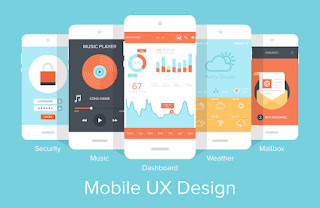
Why Mobile User Experience UI/UX Design Matters

Mobile User Experience UI/UX Design Why It Matters

When designing a digital presence, whether it is a website or a mobile app, attractive graphics and engaging content are not the only things that matter. One aspect of the web and app design that many designers still overlook is the need for good user experience design. But, what exactly is user experience design (UX Design), and why does it matter so much? Here’s why every business must think about the user experience when they design websites and apps.
Importance of User Experience UI/UX Design

What User Experience Design Is

User experience design is often used to describe the usability of an application or the user interface. The true meaning of UX design, though, goes far beyond that. UX design encompasses the entire process of software design and development. It includes branding, functionality, design, integration, and usability. UX designers look beyond simply creating usable products. They also consider the user’s pleasure and enjoyment in acquiring and using the product. UX design is the process of creating applications that are relevant and meaningful. Applications that users want to use. So, how can UX design benefit a business?

UX Design Encourages Use Interaction

Creating content is not enough. You need to create content that people will want to interact with. That includes written content, images, advertisements and calls to action. UX design includes techniques that encourage user interaction. These techniques include producing content that will appeal to the target audience. It also includes personalization features, such as “You may also like” types of functions. A UX designer will also be looking at consistency throughout an app or site. Software that is predictable and comfortable to use is software that people will want to use. 

UX Design Generates Loyalty

UX design creates customer loyalty through great experiences. An easy to use app or website backed by great service will encourage a user to use the then again. To do this, a UX designer will create a customer journey map (CJM). This maps a user’s entire journey through the site or app. This journey will be thoroughly tested to ensure that a user’s interaction with the product is as smooth and trouble-free as possible. It’s putting the design team in the shoes of the user. 

UX Design Generates Recommendations

The good UX design encourages word of mouth recommendations. The ease of use of a well-designed site or application and the usefulness of it will encourage people to tell others about the product. A part of UX design is to make sharing easy. A free recommendation from a user is far more powerful than a paid-for advertisement.

UX Design Reduces Development Costs

UX design keeps a project within budget and reduces development costs. UX design includes extensive user research, prototyping, and usability testing. This ensures that development time is targeted on the areas of functionality that matter. This focused approach means better initial design specs, less risk of feature creep, and more relevant content. It greatly recuses the need for last-minute redesigns and enhancements.

UX Design Reduces Internal Costs

UX design is end-user focussed from the outset. That concentrates design and development effort on what users want, not on what developers think they want. As well as saving money on development costs, UX design stops businesses from wasting internal resources. For example, UX design will help identify the products that people want. This would allow sales and marketing efforts to be focussed on profitable products, rather than the less profitable ones. It also reduces support costs by reducing the need for manual intervention.

UX Design Increases Profits

UX design can have a direct impact on the bottom line. It has been proven that 75% of people judge an app or website on its aesthetic design.  People are more likely to buy from a well-designed website or app than they are from an unappealing one.
The easier a site or app is to use; the more people will use it. That is true for the entire journey that a user takes through the app or website. From how fast the screens and pages load, to how easy it is to sign up for an account and place an order. If all the steps are easy, a user is more likely to progress to the final step of making a purchase or completing a desired action.
UX design seeks to reduce the number of user interactions to a minimum. It also guides the user through processes with clear calls to action. The overall effect of UX design is increased revenues, reduced costs, and improved customer satisfaction.
Historically, websites and mobile apps have been developed with the needs of the business in mind. UX design is reversing that trend and putting the needs of the user first. Consumers are becoming more and more experience-driven. Global online spending is increasing at a phenomenal rate. Businesses that don’t adopt UX design principals may soon find themselves trailing far behind the competition that does. Benefits of the web-based system.


Choosing the Right Frontend Framework in 2026: What Engineering Leaders Need to Know

In the last three years alone,  front-end  frameworks have improved more than they did in the entire  previous  decade. Faster compilation t...