Showing posts with label custom application development. Show all posts

Benefits of Custom Software Development for Businesses

Benefits of Custom Software Development for Businesses


In today's fast-paced business world, companies are constantly seeking ways to improve efficiency, reduce costs, and stay ahead of the competition. One effective strategy is investing in custom software development. Unlike off-the-shelf software, custom software is tailored to meet the specific needs of your business, offering a wide range of benefits. 

custom software development


What Is Custom Software Development?


Custom software development involves creating software solutions that are specifically designed to address the unique requirements of an individual business. This process involves a thorough analysis of the business's needs, followed by the design, development, and implementation of software tailored to meet those needs. 

Advantages of Custom Software Development Tailored Solutions 


One of the primary benefits of custom software development is that it provides tailored solutions. Unlike generic software that may only partially meet your needs, custom software is built from the ground up to address your specific requirements. This ensures that you have a solution that perfectly fits your business model and processes. 

Scalability 


Custom software is designed with the future in mind. As your business grows, so do your software needs. Custom solutions are scalable, meaning they can be expanded and modified to accommodate increasing workloads and evolving business demands. This flexibility ensures that your software remains relevant and useful over the long term. 

Integration with Existing Systems 


Many businesses use a variety of software systems to manage different aspects of their operations. Custom software can be designed to seamlessly integrate with your existing systems, ensuring smooth data flow and eliminating the need for manual data entry. This integration can lead to significant time and cost savings. 

Competitive Advantage


Having a unique software solution that is tailored to your business gives you a significant competitive edge. Custom software allows you to implement innovative features and functionalities that set you apart from competitors who rely on standard software solutions. This differentiation can be crucial in attracting and retaining customers. 

Cost-Effectiveness 


While the initial investment in custom software development may be higher than purchasing off-the-shelf solutions, it can be more cost-effective in the long run. Custom software eliminates the need for expensive licenses and recurring subscription fees associated with commercial software. Additionally, by streamlining operations and improving efficiency, custom software can lead to substantial cost savings over time. 

Enhanced Security 


Security is a major concern for businesses in the digital age. Custom software development allows you to incorporate advanced security measures tailored to your specific needs. Unlike generic software, which may have vulnerabilities due to widespread use, custom solutions can be designed with unique security protocols, reducing the risk of breaches and data loss. 

Support and Maintenance


Working with a software development company to create a custom solution means you have access to dedicated support and maintenance. This ensures that any issues are resolved quickly and efficiently, minimizing downtime and keeping your operations running smoothly. Additionally, having a support team that understands your specific software ensures that updates and improvements are made as needed. 

Agile Software Development 

Agile software development is a popular methodology used in custom software development projects. This approach focuses on collaboration, flexibility, and customer feedback, ensuring that the final product meets the client's needs. Agile development allows for iterative progress, with frequent reassessments and adaptations throughout the project lifecycle. 

Real-World Examples of Custom Software Success 

Case Study: Retail Business A retail business facing challenges with inventory management and customer engagement decided to invest in custom software development. The solution included an integrated inventory management system with real-time data analytics and a customer relationship management (CRM) platform. As a result, the business was able to optimize its inventory, reduce waste, and enhance customer satisfaction through personalized marketing campaigns. 

 Case Study: Manufacturing Company

A manufacturing company sought to improve production efficiency and reduce downtime. By developing a custom software solution that integrated with their existing machinery and provided real-time monitoring and alerts, the company significantly increased production output and reduced maintenance costs. The custom software also enabled predictive maintenance, further minimizing unexpected disruptions. 

 How to Choose a Software Development Company 

Selecting the right software development company is crucial for the success of your custom software project. Consider the following factors when making your decision: Experience and Expertise: Look for a company with a proven track record in custom software development and expertise in your industry. Communication and Collaboration: Ensure the company values clear communication and is willing to collaborate closely with your team throughout the project. Portfolio and References: Review the company's portfolio and seek references from past clients to gauge their reliability and quality of work. Post-Development Support: Confirm that the company offers ongoing support and maintenance services to address any future needs. Conclusion Custom software development offers numerous benefits for businesses looking to enhance efficiency, reduce costs, and gain a competitive edge. By investing in tailored solutions, businesses can enjoy improved scalability, integration, security, and support. With the right software development company and agile methodology, you can create software that not only meets your current needs but also adapts to future challenges. In today's competitive business environment, custom software development is a strategic investment that can drive long-term success. By understanding the advantages and following best practices in selecting a development partner, you can unlock the full potential of custom software for your business.

How to Mastering Custom Software Development Project Management

Best Practices and Strategies: Mastering Custom Software Development Project Management 


Custom software development


Introduction:

Custom software development projects are complex endeavors that require careful planning, execution, and monitoring. Successful project management is crucial for delivering high-quality software on time and within budget. In this blog post, we will explore various ideas related to custom software development project management, including best practices, strategies, and tools.


1. Choosing the Right Project Management Methodology for Custom Software Development

Discuss different project management methodologies (e.g., Waterfall, Agile, Scrum, Kanban) and how to choose the most suitable one for your custom software development project. Highlight the advantages and disadvantages of each methodology and their impact on project success.


2. Effective Stakeholder Communication in Custom Software Development

Explore the importance of clear and constant communication with stakeholders throughout the software development process. Provide tips and strategies for maintaining effective communication and managing stakeholder expectations.


3. Managing Scope in Custom Software Development

Scope creep can be a significant challenge in custom software development. Discuss techniques for defining, controlling, and managing project scope to prevent scope creep and ensure project success.


4. The Role of Project Managers in Agile Software Development

Explain the unique responsibilities of project managers in Agile software development environments. Explore how project managers facilitate Agile processes, foster collaboration, and ensure project success.


5. Leveraging Project Management Tools for Custom Software Development

Introduce various project management tools and software (e.g., Jira, Trello, Asana) and discuss their benefits for managing custom software development projects. Provide insights into selecting the right tool for your team's needs.


6. Risk Management in Custom Software Development: A Comprehensive Guide

Delve into the importance of identifying and mitigating risks in custom software development projects. Discuss risk assessment, risk mitigation strategies, and the role of risk management in ensuring project success.


7. The Art of Agile Estimation in Custom Software Development

Explain how Agile teams estimate project tasks, user stories, and sprints. Share tips and techniques for accurate estimation, helping project managers allocate resources effectively and meet project timelines.


8. Balancing Quality and Time: Strategies for Delivering High-Quality Software on Schedule

Discuss the delicate balance between delivering high-quality software and meeting project deadlines. Share strategies for ensuring code quality, performing testing, and still delivering software on time.


9. Measuring Project Success in Custom Software Development

Explore key performance indicators (KPIs) and metrics to assess the success of custom software development projects. Discuss how project managers can use data to continuously improve project outcomes.


10. Post-Project Evaluation: Learning from Custom Software Development 

Discuss the importance of conducting post-project evaluations to identify successes and areas for improvement in project management processes. Provide a framework for conducting effective project retrospectives.


Conclusion: 

Custom software development project management is a multifaceted and critical aspect of software development. By implementing best practices, strategies, and tools, project managers can enhance their ability to deliver successful custom software projects. Whether you're experienced in project management or just getting started, these ideas can help you improve your skills and make your next project a resounding success.


What is QA Testing: Best Practices for Quality Assurance

 To ensure the highest quality possible, teams must perform detailed testing of the system. They must employ a variety of testing methods. Strategies such as functional testing, regression testing, and a combination of manual and automated tests can help keep the system error-free. Take a look at this guide as we explore the answer to “what is QA testing?” and what are its benefits to your project.

When software is created, the goal is to deliver the best possible product to the customer. However, quality starts to fall short as companies struggle to keep pace with customer demands for the latest features. The outcome can be costly. According to the Consortium for Information and Software Quality, poor software quality cost US companies $2.08 trillion in 2020. Keeping the system bug-free requires dedicated effort at all project phases. That’s where quality assurance (QA) comes in. With QA, teams take planned steps to ensure the system meets requirements and provides the best customer experience possible. Here we’ll answer questions such as “what is QA testing?” and “why is QA testing needed?” We’ll also give you a few best practices to help you get started.

What is QA Testing?: The Essentials

Imagine standing in the grocery store picking out an apple. You can instantly evaluate its quality. If it’s the right size, the right shape, or ripe enough. But only after you take the first bite can you tell how good that apple is. Even the best-looking apple might have a sour taste. The same applies to software products. The user interface (UI) might seem fine at first. But as you start scrolling down or navigating pages you may start to see design flaws and errors. That is why validating the system thoroughly is essential to ensuring the system meets all user requirements, validating that the architecture and design support performance requirements, and ensuring integrations with other systems work properly. Overall, system testing helps improve product quality, ensures system security, and helps improve customer satisfaction.

custom software solutions


Best Practices for QA Testing

Delivering high-quality software doesn’t happen by chance. The team must be disciplined in its approach. This helps ensure they run all possible scenarios of testing to ensure they eliminate bugs. Here are a few best practices that make this possible.

Have a Plan

A detailed test plan gets the team on the same page about what will be tested, by whom, what resources are needed, and the agreed-upon timelines. The plan also outlines the acceptance criteria. Another item to consider is to ensure the test time frame aligns with project timelines.

Report and Track Bugs

Reporting and documentation are critical to providing insights into the status of testing. Ensure the testers clearly document all bugs. If something is unclear, developers will spend too much time clarifying the issue rather than fixing it. To improve clarity, include screenshots, video, and audio. Also, include information such as OS, hardware, browser, or device where the error occurred. Testers should aim to provide enough information for the developer to recreate the issue.

Run Frequent Regression Testing Cycles

Sometimes, even the simplest change can impact something that was already tested. Regression testing verifies if code changes introduce issues that impact existing functionality. Perform regression testing anytime new code is introduced. During this evaluation, new test cases are not generated. Instead, the team re-executes existing tests to determine that the previous functionality still works. That way, the new code gets validated along with the old code.

Incorporate Agile Methodologies and CI/CD

In traditional projects, QA testing is relegated to a separate phase of the project. However, with an agile approach, QA testing is a part of the design and development phase. That way, quality becomes a guiding principle rather than an afterthought. With agile, the testers and developers collaborate through constant communication and feedback. According to Forbes, companies that use agile benefit from quicker turnaround times, easier maintenance of existing deployments, and superior quality.

The main feature of an agile methodology is that it uses short development and release cycles. Developers release small code changes rather than a large section of code. As a result, testing can take place in small, more focused areas of the system. This ultimately leads to a more thoroughly tested system.

Leveraging automation is the key to seeing benefits from an agile approach. CI/CD is the perfect complement to agile. The code gets automatically tested with a CI/CD pipeline as soon as the developer commits their code to the central repository. If the tests fail, the developer will be notified. They must fix the issue before they can continue with the build. If the build passes, the code is automatically pushed to the next environment. Teams can test more efficiently and release new features more quickly with this approach.

Separate Security and Performance Testing

Validating application security and application performance requires two distinct sets of skills. This is especially true as cyber threats evolve. Having your team attempt to keep up with these changes will dilute the capabilities of team members. Have testers who are proficient with software security perform security tests. Assign testers who are proficient in performance testing to validate the system’s performance. That way, your developers can focus on their core skill set.

Multi-Directional Testing Strategy

Don’t rely on one technique. Instead, employ a variety of the types of techniques noted above. This approach helps ensure better test coverage. As a result, the team has a better chance of detecting “hidden bugs” that might have gotten overlooked had they relied on only one or two methods.

Be sure to Test Compliance With Regulatory Industry Requirements

Most companies have a set of rules and regulations they must follow to protect their company’s data and customers’ personal information. Make sure your system follows all required laws. A few of these regulations include:

  • General Data Protection Regulation (GDPR): An EU-based regulation to secure the personal information of EU residents,

  • Health Insurance Portability and Accountability Act (HIPAA): A US-based regulation to protect health information in the US

  • Payment Card Industry Data Security Standard (PCI DSS): Protects customers’ payment card information globally.

Perform Risk-Based Testing

With Risk-Based Testing (RBT), teams prioritize their efforts based on the probability of risk. A risk is an occurrence of a specific effect based on predefined and measurable success criteria. Risks often have an impact on costs and quality targets. The team assesses the risk based on things such as the complexity of the system or frequency of use. Using this information, the team prioritizes which areas to test based on the probability of a defect occurring in a specific area.

What is QA Testing Without The Right Business Partner By Your Side?

If you want the best possible outcome for your project, having experts on your team is key. The right business partner gives you a dedicated team of QA testers to ensure your application has the highest quality product.

Aezion gives you all of this and more. Our team can perform all types of testing, including web application, mobile, manual, and automation testing. If you want to explore QA testing for your project, speak with one of our experts. We’ll help develop the best model for your project. Contact us today to discuss your custom project.

What is an API ? how API will work

 What is an Application Programming Interface(API)?

An API is a set of instructions that allows two software applications to communicate with each other. APIs can be used for many purposes, such as retrieving information from a database, sending data between two pieces of software, or showing content from one website to another.

Developing an API is a process that takes time and effort. The first step in developing an API is to create the interface (or "API spec") which documents how the end user should interact with the system. Then developers need to build out the functionality needed by the interface and finally test it before releasing it to customers.

API Development

How API Will Work 

An API is a software component that provides a way for other applications to interact with one another. It can be seen as a sort of middleware between two systems, like an operating system and an application.

APIs are the most efficient way for developers to share their code and data with other developers. They are also the easiest way for custom software developers to use third-party services in their own apps.

The best thing about APIs is that they are very easy to understand and use, so even beginners can start building new features into their apps or websites by using someone else’s API.

An API is a set of functions and protocols that allow two computer programs to interact with each other. APIs are used when one program needs to provide data or services to another program.

Benefits of custom software development company

 Custom software development companies are more expensive than other types of software development, but they also provide better quality.

Custom software development companies are more expensive than other types of developers, but they also provide better quality. In addition, the customer has the opportunity to specify the exact requirements for their project and get a product tailored to their needs. This is much more difficult with other types of developers.

A custom software development company is a type of company that provides specific software solutions for its customers. They are different from typical IT companies.

Custom software development companies have a number of advantages over other types of IT companies. One of them is that they can provide more specialized and personalized products for their clients.

Benefits of custom software development company


A custom software development company is a company that specializes in developing custom software for its clients. They are responsible for the success of the project and they have to provide all the necessary resources to make it happen. Follow the benefits of a customized software development company.

Benefits of custom software development companies:

*   Custom software development companies are equipped with the latest technologies, which makes them more competitive than other companies.

*  They can offer higher quality products compared to other companies because they have specialists in all kinds of fields that can work on different parts of the project at the same time.

* Custom software development company provides a wide range of services, which means that they can meet any client’s needs.

The Benefits of Web-Based Systems for Business

Web-based applications used to be very limited in functionality. However, advances in technology, security, and internet speeds have greatly increased the potential scope of web-based systems.  Today, we have web-based business accounting systems, web-based CRM systems, a web-based Microsoft Office, and more. Web-based applications offer some significant advantages over native, client-based software. Here are just some of the benefits of web-based apps for business.
Web-Based System for Business


What is a Web-Based System?

A web-based system is an application that is accessed via HTTP. The term web-based is usually used to describe applications that run in a web browser. It can, though, also be used to describe applications that have a very small component of the solution loaded on the client PC. The host server for a web-based system could be a local server, or it could be accessed via the internet.

Lower Development Costs

A web-based application runs in a web browser. That means that a single, responsive web application can be used across multiple device types. Although web apps will need to be tested on different browsers, there is no need to test them on different operating systems. This makes development and testing much easier. It cuts development costs and reduces development time.

Easy Installation and Maintenance

Unlike traditional software that is loaded on each device, web applications run from a host server. There is no installation on local machines. Software upgrades are all completed centrally. That reduces the costs of installing and upgrading software. It also ensures that all users are always using the same version of the software.

Accessible Anywhere

Users can access a web-based system anywhere. So long as they have an internet connection, a web browser, and the appropriate login details. This means that users can access the data they need when they are away from the office. It also brings the possibility of staff working from home.

Easy Data Sharing and Collaboration

The sharing of data and collaborating on projects is made much easier with web-based systems. Data is stored in one central location, so users can share data and work together on projects. It is also easier to integrate web-based systems than isolated desktop applications.

Centralized Security

As web apps are installed on web servers, security is controlled by an IT professional. That avoids sensitive corporate information being held on many local client PCs, which are not as secure. Employees can access data when they are away from the office via a web application. So, it is not necessary for data to be held anywhere other than the secure central location.

Reduced Hardware Costs

Web-based systems can eliminate the need for powerful client PCs. Processing is carried out on the host server. The host server can be engineered to efficiently service simultaneous, peak demand. So, the storage, processor, and memory requirements for client PCs can be reduced. Taken across an entire organization, this can represent a large cost saving for some businesses.

Increased Efficiency

In most businesses, the deployment of web-based solutions leads to the streamlining of business processes. Often, paper-based processes can be replaced by workflow-based solutions. The business process improvements can lead to higher employee productivity and lower costs.

Adaptable to Changing Workloads

The deployment of web-based applications requires no software loading on the client PC. All that is needed is the setting up of a new user and the relevant secure access controls. This can be a major benefit for growing businesses, or for seasonal businesses. Users can be added or removed very quickly.

Greater Availability of Information

Web-based systems make it easier to provide access to real-time information. The paper reports that might take days to prepare and distribute can be replaced on online reports and digital dashboards. That can improve the quality and the speed of decision-making, right across an organization.
Custom application development can provide businesses with significant cost savings and productivity improvements. Now that internet access is almost universally available and internet speeds have significantly improved, applications that previously had to be client-based can now be deployed on the web.
Although this is the case in developed Western countries, it is not the case worldwide. In some countries, internet access is unreliable. So, the major deployment of web-based applications may still not be possible. International organizations with overseas offices may not yet be able to take full advantage of web-based solutions.

For domestic organizations, though, web-based systems have a promising future. From web-based office applications, like content management systems and productivity applications, to custom web-based software developed specifically for your organization, the foundation of many future software solutions is likely to be web-based.

The Complete Guide to Custom Software Development System Life Cycle Model


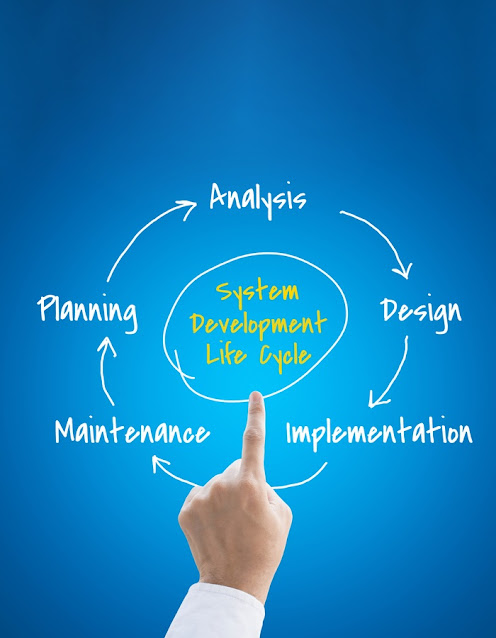
Custom Software Development System Life Cycle

The software development life cycle (SDLC) is the process of developing and maintaining a software product. This process can include multiple stages such as requirements analysis, design, implementation, testing, and deployment.

The SDLC has five phases: analysis phase, requirements phase, design phase, implementation phase, and test phase. Depending on the type of project these phases may not always be necessary or integrated into a single phase. For example, in the case of an incremental release with no maintenance required for a software product these phases may be combined into just one or two phases.

The requirements for custom software development are many. The software must be able to maintain data integrity, be easy to understand and intuitive, provide security, and more.

Custom software development is an exhausting process with long hours. But it is worth it in the end because you get what you want - a custom piece of code that will work exactly how you need it to.

Custom software development is the process of developing or customizing software systems to match the requirements of specific end-users.

The life cycle can be broken down into 4 phases: design, coding, testing, and deployment. For each phase, there are different activities that need to be done.

The design phase is the first part of the software development process where you figure out what needs to be done with your system. You create a conceptual design based on user needs and business requirements.

The coding phase is about turning your design into code that can run on a computer system. This includes writing code for individual modules of your application, connecting different modules together, debugging code errors, and deploying it on a server for use by others or users of your application

Custom software development is the process of developing software that meets the specific needs of a given client.

The life cycle of custom software development can be seen in four stages - Analysis, Design, Development, and Deployment.

Analysis refers to the evaluation of needs and the activities involved in gathering information on these needs. Design is the stage where designing new systems or modifying existing ones are done according to gathered information at the analysis stage. Development is where coding takes place for functionalities described in the design stage. Deployment means the deployment of developed systems or subsystems into the production environment for use by end-users.


Custom Software Development Definition 

Custom software development is the process of creating software that is not off-the-shelf. It can be developed for a specific business need, or to meet the needs of a particular customer.

Custom software development has many advantages over off-the-shelf software. The main advantage is that it can be tailored to suit your specific needs, which means it can be much more efficient and more effective than an off-the-shelf solution.

The initial stage of the custom software development system life cycle is planned. It includes tasks such as establishing Goals and Objectives as well as determining the feasibility of project Goals. The next stage is a design which includes tasks such as designing architecture, writing specifications, creating mockups, developing prototypes, and identifying risks that need to be mitigated. The next stage is coding which includes tasks such as designing code and implementing the design into code.

Custom Software is also known as custom-made or tailor-made software. It is developed to satisfy unique business needs. It is a process of building customized software or bespoke software for digital solutions. Custom Software Development is designing a software application for a specific group of customers within the organization. Such custom software is designed to address their needs precisely as opposed to the more traditional and widespread off-the-shelf software. Such software is typically created just for that specific entity by a third-party by contract or in-house team of developers and is not packaged for reselling.

Custom software development differs from the software packages developed for the mass market, such as existing free software and commercial off-the-shelf software. Unlike traditional software products, custom ones are designed to accurately meet the needs of the target customers or organization requirements.

System Life Cycle 

Custom software must go through a software development process that includes discovery, strategy, design, analysis, development, maintenance, planning, analysis, and Implementation. The best developers use an iterative process to explore ideas, get feedback, and incrementally release new features and functionality. This process can range from a couple of months to years, depending on the size and scope of the software development project. Software development can be a significant investment with lots of risks, so a good process will help mitigate risk and launch a successful product.

If your organization has an in-house IT department with the appropriate capabilities and bandwidth, then you can build the software internally. Otherwise, you’ll need to hire a custom software developer to partner with you to create the custom software project. Also, in many cases, there is a mix of internal and external team members that work together to build good custom software development service outcomes.

Planning and Analysis Creates Good  Custom Software Outcomes


A winning client software project is one that delivers an answer to objectives on time. That needs good design from the beginning of the thought life of the project. Work along with your custom package developer and keep centered on your key objectives. This will make sure that you receive a custom software solution that meets your business wants and provides you with an honest come back on your investment.

Preparing Your Business for AI Bot Development and Deployment

Introduction

Artificial intelligence (AI) and AI bot development are no longer the sole preserve of large corporations and scientists. AI bots are becoming available for businesses of all sizes.
AI is a technology that will transform businesses. To date, we have only seen the tip of the AI iceberg. And, no one is 100% certain of what lies beneath the surface. So, how can you prepare your business for this revolution that is coming soon? How can you prepare for a revolution that will bring changes that no one can predict with any certainty? The answer is; you must begin making cautious and measured preparations now.

Learn About What AI has to Offer Your Business

The first thing you should do to prepare for AI is to get key staff in your business thinking about the technology. AI is an emerging technology. So, avoid any preconceptions that may have about the AI bots and AI bot development. Don’t fall into the trap of thinking that AI bots are only chatbots. Look further afield at what AI may be able to do for your business in the future. Look at how your competitors are implementing AI. Look at how AI is being implemented in businesses outside of your own niche market. Research where AI bots are likely to go next and how to prepare your business for AI Bot development. Here are a few of the business processes that AI bots are already automating:
  • Intruder detection
  • Answering users’ technical questions
  • Automating production management
  • Internal compliance monitoring
  • Anticipating customer purchases
  • Monitoring social media
  • Financial trading
  • Automated call distribution

Understand Your Business Needs

It is important that businesses don’t begin to use AI technology for the sake of having AI. Businesses should use AI bots and define AI Bot development projects to meet a defined business need.
Preparing Your Business for AI Bot Development and Deployment


A support desk that provides award-winning support services, for example, may not need AI bots. In this case, using chatbots to answer support calls might be a backward step for the business.
If a support desk is overrun with calls, though, Chatbots might improve the service. They could reduce waiting times and reduce the number of customer complaints.
The starting point for preparing for AI bots is to understand your business needs. Don’t look for the business processes that AI could fit. Identify the business processes that AI Bots could improve.

Set Realistic Expectations for AI Bot Development Projects

AI is not the solution to everything. Customer service bots are great for very busy call centers. But, if you only receive a few calls a day, AI would not be necessary. AI bots are also useful for data mining. But, if your data set is small, a human would be able to complete the job as fast, because there would be no setup time involved.
Instead of trying to revolutionize your business overnight, start with something small. Start by looking at automating a small task that is currently time-consuming or very expensive to complete and defining an AI Bot development project to achieve that objective. Implementing AI will be a steep learning curve for all businesses. It is better that you learn by first implementing AI to complete a minor task. Then, you can start thinking about AI for mission-critical tasks.

Don’t Forget the Staff

Using AI bots is likely to have a big impact on your staff. It will bring new challenges and staff will need retraining. Staff will also have concerns about job security when you begin to use AI bots. So, it will be important to address the needs of the staff as a part of your AI strategy.
Provide employees with training so that they can work with AI bots. Think ahead about how employees might need to move into new roles. AI is likely to change the roles that people fill rather than replace the need for people. If you want artificial intelligence to deliver results, you will need to train your employees on how to work with and manage AI bots.

Start Preparing Your IT Infrastructure Now

One of the major potentials of AI for businesses is that it can use data from many different sources. This might be combining internal customer data with market research data, for example. Combining data from different systems can be a challenge. Especially if those systems cannot already communicate with each other.
AI bots will be able to perform more than one or two functions in a business. In the future, AI will work across all business systems. The use of AI will impact all areas of a business. Transitioning to AI will be easier if all your systems sit on a common platform. The easier it is for systems to share data, the easier it will be to sit AI bots over the top of all those systems. This is something that businesses can build into their IT strategies now.

Conclusion

AI is something that will need to revisit on a regular basis. You will need to track the progress of your own implementations of AI bots. And, you will need to keep abreast of new developments in AI. AI is with us today, but it’s got a long to go. So, the best way to begin using AI in business is to introduce it in small steps — perhaps starting with a few carefully defined AI Bot development projects. The first step is to start preparing for now.

Natural Language Processing – What it is and why it’s important

Introduction

Natural Language Processing — the application of software systems to examining, interpreting and accurately responding to speech is viewed as the next big leap in user interface technology. However, human speech is far more complex than most people realize. There are rules, such as spelling and grammar. How we interpret speech and text, though, is far less well-defined. How do you know when a person is being sarcastic, for example? How do we know that an athlete’s explosive sprint to the finish line didn’t involve any pyrotechnics? In human language, the words can say one thing, but the context and the tone make those words mean something else.
It takes humans a half a lifetime to learn the subtle nuances of language. Even then, there will be words and phrases that some of us don’t understand. Then, there are further complications in understanding language, such as dialects and colloquialisms. So, how can a computer that “thinks” in binary be programmed, line by line, to become fluent in any language? The answer is; it can’t. But, thanks to the advent of artificial intelligence (AI), a computer can now learn how to understand a language.

What Is Natural Language Processing?

Natural language processing (NLP) is a branch of AI. NLP relates to humans and computers communicating using natural language. NLP includes both speech recognition and reading text. Using machine learning, a computer is now able to learn how to understand our speech and writing. Computers can now look at more than the keywords to decipher our language. It can pick up on the more subtle aspects of our language to interpret the contextual meaning of the words.

Why is Natural Language Processing So Important?

In the past, computers could only work with structured languages. The language had to be precise and unambiguous. To program a computer to perform any task, you had to give it clear instructions. You could only use the limited number of commands that the computer understood. The syntax had to be perfect as well.
Even an end-user of a computer program needs to give the computer precise commands. Those who are old enough will remember that to use a PC you once had to know the common MS-DOS commands. That barrier was overcome, to a degree, with graphical user interfaces, such as Windows. Now, we can point to a file with a mouse, instead of having to know the name of the file.
NLP promises to remove the need for being so precise. Instead of having to learn the computer’s language, the computer will learn how to understand ours. A very basic application of NLP will be how we interface with computers. We won’t have to tell the computer to open our “aprilcashflowforcast.XLS” file. We will be able to ask the computer less precise questions, such as “How much cash have we got coming in this month?”
Natural Language Processing


Practical Business Applications of Natural Language Processing

NLP is not an emerging technology that will, one day, have applications in business. It is a technology that is in use now. NLP is being used in applications such as online searching, and grammar checkers. That’s why you can now search on Google using normal sentences. NLP goes far beyond simplifying the computer/human interface, though. Being able to understand human language has many other practical applications. Here are few examples of how NLP is being used today:

Language Translation

NLP programs learn a language in the same way that humans do. And, like humans, if a machine can learn one language, it can learn many. There are now neural machine translation programs that can translate between languages. The first of these was Microsoft’s Bing Translator.

Chatbots

NLP has made chatbots far more effective. This has increased the applications that chatbots are now used for. In HR applications, for example, chatbots are now answering employees’ questions. There is a chatbot called Talla that will answer questions such as “Do I have any vacation left?”.

Document Reading Tools

NLP is also able to read and interpret the written word. One of the practical uses for this technology is the sifting of job applicants’ resumes. Machine learning allows text reading applications to learn synonyms. This is important when reading a resume because people use different terms to describe their personal qualities and their work history.

Sentiment Analysis

As NLP can understand the nuances of language, it can also understand the sentiment of the words. There is a technology known as opinion mining. This can analyze the opinion that people have of a brand by looking at blogs and social media profiles. It can understand the sentiment of posts and comments left by customers. Analyzing vast amounts of data like this would be an impossible task for a human.

Conclusion

Natural language processing is a major leap forward in AI technology. It removes the communication barrier that has always existed between machines and humans. The potential for the application of NLP in business is immense. A computer could now answer customer queries and take orders. Even if the customer uses obscure language. NLP is likely to remove the need for input devices, such as the keyboard and mouse as well. NLP matters, because it is about to revolutionize the way that we communicate with machines, and how they communicate with us.

Robotic Process Automation and Its Applications

Introduction

Many large enterprises are using robotic process automation (RPA) to reduce costs and improve efficiency. By implementing RPA, businesses can automate repetitive and mundane tasks. RPA could represent the first step towards true intelligent automation. But what is RPA, and what are its applications in business?

What Is Robotic Process Automation?

RPA is a term that can be applied to any computer program that automatically performs a repetitive function. In its simplest form, RPA is the automatic out-of-office message that your email software sends. More sophisticated RPA bots can log into an application, perform tasks, and log out again. RPA is not a part of an organization’s IT infrastructure. RPA sits on top of the infrastructure and automates tasks that humans would otherwise perform.
There are three main types of RPA bots. There are programmable bots that interact with other systems. There are intelligent RPA bots that can make decisions based on unstructured data. And, there are self-learning bots, such as chatbots.
Robotic Process Automation is a software technology that automates the execution of tasks, typically those that are repetitive and mundane.
Robotic Process Automation (RPA) is an emerging trend in business process automation. It is a type of computer programming that uses software to control the execution of routine tasks. RPA automates these routine tasks by mimicking human actions, such as clicking or filling out forms on a screen.

Examples of RPA Applications
RPA is suitable for use on tasks that are repetitive, well-documented, and well-defined. If the task is rule-based, and it does not alter often, then it is a task that could be completed by RPA. Robotic process automation can automate a wide variety of tasks in many different industries. Here are a few of the practical applications of RPA.

Web site scraping

RPA can be used to gather information from web pages. Examples of this include extracting and summarizing data from stock trading websites. Once the data has been collected and summarized, it can then be passed to humans for further analysis.

Automated email processing

Many organizations receive lots of emails asking the same questions. RPA can take care of some of these emails and respond with standard replies. The emails that the RPA bot cannot answer can then be forwarded to the appropriate personnel for answering.

Data Cleansing

Data cleansing is a good example of where RPA can be used to complete time-consuming tasks. If there are clear rules as to what constitutes bad data, RPA can filter out that bad data much more efficiently than humans.

Data Entry

One of the most far-reaching applications of RPA is that of data entry. An RPA bot can read original forms using optical character recognition (OCR) and then “key” the data into an application. This would be faster than a human could key the data, and it would be more accurate.
Robotic Process Automation


The Benefits of Robotic Process Automation

The benefits of RPA to businesses are many. RPA removes the human error factor from many tasks. The effectiveness of RPA can be limited by the accuracy of technologies, though. Technologies such as optical character recognition and speech recognition software. Even so, RPA bots can work 24/7 without breaks, and they never get bored. Bots also only need training once, and they will never quit their job.
RPA technology brings more than only cost savings. It also improves the customer experience through faster processing of data and faster resolution of queries. For employees, it brings that removal of the boring, repetitive tasks, so that they can spend more time on the important aspects of a role. RPA will change the nature of some jobs, so the HR aspects of those changes must be planned for as well. Overall, though, RPA will change the nature of employment for the better, rather than put people out of work.

Why Businesses Need to Consider Robotic Process Automation

RPA is a technology of today, not of the future. RPA bots are being used in accounting, finance, HR, and marketing now. American Express Global Business Travel uses RPA to automate the canceling of airline tickets and the issuing of refunds. At Walmart, RPA bots answer employees’ questions. In the future, some elements of almost every business process could be automated by RPA.
Robotic Process Automation won’t replace the need for humans. But it will remove the need for humans to perform programmable repetitive tasks. Businesses that do not embrace RPA will find themselves falling behind their competition. They will find that their customer service functions are slower and less efficient. And, they will become less competitive because of the additional costs of employing humans to perform tasks that are better performed by boots, and by not innovating by freeing up humans to do things that bots cannot. Eventually, businesses that do not use RPA will also find it difficult to employ people to perform repetitive tasks. Like their customers, their employees will have all moved to the companies that are using Robotic Process Automation to make life better for customers and employees.

Choosing the Right Frontend Framework in 2026: What Engineering Leaders Need to Know

In the last three years alone,  front-end  frameworks have improved more than they did in the entire  previous  decade. Faster compilation t...