A Blog – Its importance & Why Every Business Needs One

In today’s digital world, every business needs a website. Modern business owners and managers understand the need to have a presence on the web. What is surprising, though, is the number of businesses that don’t leverage the power of a blog at all. Or, they have one, but they rarely update it. Here’s a look at what you are missing out on if you don’t make regular use of one.

A Blog Grows and Strengthens a Brand

A blog helps to build and strengthen a brand. Without one, building a brand can be an uphill struggle. It provides you with the opportunity to connect with customers and prospects and allows you to convey the ethos of your business. It also gives you a platform on which you can tell the stories that will create interest in the brand and foster brand loyalty.

It Fosters a Community

Blogs help you build a community around your brand. They can encourage feedback, reviews and comments. When you post relevant and engaging content, the community will grow. As more people subscribe to your blog, you will create a valuable list of people interested in your products, services, and your brand.

Blogging makes you an Authority in Your Sector

A business blog is a platform from which you can build your authority in your sector. You can show that not only you do you sell products or services, you are also experts in your field. You can post technical articles, tips and advice, and opinion pieces. This will gain the trust of readers.

A Blog Will Boost Your Search Engine Rankings

When you post content, you can target your profitable keywords and improve your position in search engine results. Good quality content posted regularly will make it much easier for people to find your website. Google favors websites that have fresh, relevant content. A website with a blog will always outperform a website without one.

Blogs Allow You to Post Timely Content

Modern content management systems like WordPress or Drupal make posting to a blog a simple task. It is usually something that you can do in-house. That means that you can react fast to industry trends and developments. You can post comments on current events and increase the relevancy of your brand. A blog allows you to demonstrate that you are at the forefront of your industry. 

Blogging Breeds Innovation

A hugely beneficial side-effect of producing regular content is that it breeds innovation within your organization. To write blog posts, you will need to keep updated with industry developments. You will need to research competitors and new technologies. The combination of research for new posts and the feedback you get on your blog will help you formulate new ideas for your business.

It Is an Integral Part of a Good Digital Marketing Strategy

A blog is an important part of a coherent digital marketing strategy. It can provide detailed information that is needed to turn lead into a sale.  Blog posts can contain a level of detail that you can’t have in social media posts. You can lead prospective customers from digital advertisements or social media posts to a re-enforcing blog post to a call to action at the end of a post.

Your Free Public Relations Platform

You can use a blog for PR purposes. You can announce new products, events or key appointments. Unlike some other PR platforms, you have full control over your this effective means of directly communicating with your audience. 
                  Importance of Blog  Every Business

Blogging Generates Leads 

People are more likely to subscribe to an informative blog than other types of mailing lists. If you produce useful content on a regular basis, you will soon start to see your mailing list grow. Once you have a list of subscribers, you can send them invitations to corporate events, details of special offers, and company news. Be sure, though, that you don’t overdo it, or you will start to lose subscribers.
A blog can be the foundation of a business’s marketing, PR and brand development. It can also be a very important part of the sales funnel. The business of blogging does, though, need to be taken seriously. The wrong type of content can backfire. If you post engaging content that is relevant to your brand image and the sector you operate in, a blog can indeed be a very powerful business marketing tool.

Dangerous command in SQL

SQL Server/Microsoft Data Platform professional with over 10 years of experience working in various fields such as financial, healthcare, and Manufacturing Domains. we have worked in various DB-related roles from database Modeler to database developer to Data Warehouse.

The most dangerous command in SQL


There’s one command, in particular, that has been effectively hidden since it was introduced pre-SQL Server 2000.


I present to you DBCC WRITEPAGE – the most dangerous command you can use in SQL Server.
Well, no danger of death 
DBCC WRITEPAGE allows you alter any byte on any page in any database, as long as you have sysadmin privileges. It also allows you to completely circumvent the buffer pool, in other words you can force page checksum failures.
The purposes of DBCC WRITEPAGE are:
  1. To allow automated testing of DBCC CHECKDBand repair by the SQL Server team.
  2. To engineer corruptions for demos and testing.
  3. To allow for last-ditch disaster recovery by manually editing a live, corrupt database.

It’s not advised that you attempt #3 unless you’re confident you know what you’re doing and the side-effects on the Storage Engine from the byte(s) that you’re changing.
It is a very dangerous command because:
  1. It is an entirely physical change to the page – nothing is logged in the transaction log, and it cannot be rolled back.
  2. You can change any page in any database. For instance, you could use it to modify a page in master so that the instance immediately shuts down and will not start until the master is rebuilt and restored.
  3. Anyone with sysadmin privileges can use it and there is no way to stop it.
  4. It breaks the support of your database.

You can very easily shoot yourself in the foot very badly playing around with this command. This isn’t hyperbole – it’s just the truth.
bcc WRITEPAGE ({‘dbname’ | dbid}, filed, pageid, offset, length, data [, directORbufferpool])
The parameters mean:
  • ‘dbname’ | dbid : self-explanatory
  • fileid : file ID containing the page to change
  • pageid : zero-based page number within that file
  • offset : zero-based offset in bytes from the start of the page
  • length : number of bytes to change, from 1 to 8
  • data : the new data to insert (in hex, in the form ‘0xAABBCC’ – example three-byte string)
  • directORbufferpool : whether to bypass the buffer pool or not (0/1)

DBCC WRITEPAGE does the following:
  • Checkpoints the database and flushes all its pages out of the buffer pool
  • Unhooks SQL Server’s FCB (File Control Block) from the data file
  • Creates its own FCB for the file
  • Does a direct read of the page into DBCC’s memory
  • Modifies the page directly
  • Writes the page directly to disk, bypassing the buffer pool and any page protection generation (i.e. not recalculating the page checksum)
  • Fixes up the FCBs again

The syntax is:
12
3
4
DBCC TRACEON (2588);GO
DBCC HELP (‘WRITEPAGE’);
GO

If you’re going to play with it, please do not use it on a production system, and be very, very careful. It’s very easy to do something disastrous. And remember, if you use DBCC WRITEPAGE, you do so entirely at your own risk.
Dangerous command in SQL

The Benefits of a Content Management System

A content management system (CMS) is software that enables end-users to create and manage content on a website. They are designed to make content management easy for non-technical users. One of the key features of a good content management system is that no coding is needed to create or modify content. CMS handles all the basic coding, so users can concentrate on what visitors to the website will see, rather than what goes on behind the scenes.
A content management system consists of two main elements. First, there is a content management application (CMA). The CMA is the part of the application that allows users to add content and manage it. The second element is a content delivery application (CDA). This is the backend application that formats the content and makes it available to visitors to the site.


The Benefits of a Content Management System

The main benefit of a content management system is that it allows non-technical people to publish content. This dramatically cuts the cost of maintaining a website. You may still employ the services of a web developer to design and set up a site. But, with a CMS system, you will be able to publish and modify content yourself.
The second major advantage of a CMS is that it allows collaboration. Multiple users within an organization can create and publish content. The user interface of a CMS is usually browser-based so any number of users can access the system from anywhere.


Examples of Content Management Systems

One of the most popular content management systems is WordPress, but there are hundreds of other CMS platforms. WordPress is an open-source CMS tool that is used by large businesses, small businesses, and individuals. It is estimated that WordPress is the CMS behind more than 30% of the world’s websites. Some of the other popular platforms include Drupal, Joomla, and Magento.


Important Things to Consider CMS Platform

While WordPress is popular, it is not the only option. Before you choose a content management system, you should look at what your overall goals are.  You will need to think in detail about the functionality that you will need. This will help you choose a CMS platform that is right for your business rather than simply opting for the best-known CMS. Here are some things to consider when choosing a CMS platform.


Ease of Use

Ease of use is the main thing to look for in a CMS platform. However, some CMS systems cross the line between ease of use and lack of functionality. Make sure that the CMS platform use is intuitive and easy to use. But, remember to make sure that it has sufficient functionality to meet your needs.


Availability and Cost of Add-ins

You can usually add functionality to CMS platforms with modules, which are often called plugins. These are usually made available by third parties. They may, or may not, be free. When you are researching CMS, investigate the availability and the cost of plugins. If the CMS platform you choose only has limited out-of-the-box functionality, then you will be relying on plugins to customize your content management solution to your own needs. Plugins expand functionality, but they can lead to maintenance issues. Because they are written by third parties, they may not always be compatible with your version of the CMS platform.

Importance of Content Management Systems


Look and Feel Flexibility

It is important that your website looks different from all the rest. This can be difficult with some of CMS platforms. If there are only a limited number of themes or templates, and a few customization options, it will be difficult to make your website uniquely your own.


Responsive Design

More half of internet traffic now comes from mobile devices. So, responsive mobile design is essential in a CMS platform. Make sure that the CMS platform you select supports responsive web design. That will ensure that your web pages will render properly across different types of devices.


Speed

Speed is an important consideration in several areas. The first aspect of speed relates to ease of use. How easy will it be to install the software, configure the website, and publish content. The second aspect is the speed that the site will operate. The speed at which web pages are rendered is vital. If a website is slow to load or refresh, visitors will become frustrated and move on to another website.


Integration

The ability to integrate a CMS platform with third-party applications can also be very important. You may want to integrate your website with an e-commerce solution, a CRM package, or an automated marketing system. Investigate the availability of Application Programming Interfaces (APIs) and find out what support there is for integration. Even if you don’t want to integrate your CMS with third-party applications now, you may want to in the future.


Scalability

Another factor to consider is how scalable the CMS platform is. Will it handle large spikes in traffic? Can you add resources to cope with increasing traffic? If you plan on having more than one website, does the CMS application offer multi-site support?


Security and Support

You should also check what security features come with the software, and what extra third-party security applications you may have to use. All websites are targets for hackers, but some platforms have much better security features than others. The support services that are available for CMS platforms vary as well. High-end open source applications like WordPress are typically built with sophisticated security mechanisms but do not provide support service for CMS installation and maintenance so you may have to use a third-party support service.
To choose the right CMS platform for your business, you will need to assess both your current and future requirements. There are plenty of CMS options, but making the right decision at the outset will save you a lot of time in the future. Content can be migrated from one platform to another, but it can be very time consuming to do so.
It is advisable to seek advice from a company that specializes in digital marketing. If you can, it is also useful to test drive the software before you commit to using it. The decision you make now on a CMS platform could have a major impact on your organization in the future.

Docker Container-based Custom Application Management - what business leaders should know

Docker Containers Business Leaders Need to Know

Docker Containers have become an essential element in modern, high-performance IT operations practices — particularly in the cloud computing era. This article defines what containers are and why they are important to your business, whether you are responsible for just managing a single server or running IT operations at scale.

Docker Containers Background
IT operations are responsible for managing and maintaining an efficient and reliable computing infrastructure that supports the range of computing tasks performed by a business. These tasks are facilitated through enterprise resource planning applications that support Human Resources, Finance, Customer Relationship Management, Project Management, Operations Management and Workflow, Logistics, Reporting and Analytics, and more. While these applications differ in function all share a common dependence on efficient, reliable, and responsive computing resources. These resources include an operating system, processor, RAM, storage and networking elements. Historically, these individual elements were organized and managed as physical server units, then virtual machines with the advent of virtualization technology.
Virtual Machines improved overall computing resources and IT operations efficiency through increased sharing of physical hosts and host files and libraries. This reduction in physical servers and increased utilization of host files and libraries led to a reduction in Capital and Operations Expenditure, and improvements in Developer and Customer Experience. 
Containers extend the efficiency trajectory of Virtual machines by allowing apps to run in a dramatically simplified and light-weight environment compared to physical servers and virtual machines. Containers disassociate dedicated application dependencies from shareable OS elements. These shareable elements are abstracted and packaged as single-instance, shareable resources that further improve resource utilization. 

Containers and Docker

Containers were introduced as an extension of the Linux Operating System in 2001. They are an evolution and formalization of namespace isolation and resource governance techniques used in pre-Linux Operating Systems such as Solaris Zones, Unix chroot and BSD Jails. The Docker Container specification presented a common packaging model, test and deployment model that dramatically simplified containerization and application deployment on Linux hosts. The specification was realized as Docker images that contained shared host and VM files and libraries. This evolution led to further improvement in computing resource utilization — maximizing resource sharing by eliminating VM-related overhead — and significant improvement in IT operations and application management. The result is further improvement in Capital Expenditure, Operations Expenditure, and Customer Experience. 
The benefits of Docker Containers were introduced to Windows hosting environments with Windows Server 2016. To support this initiative, Microsoft established a partnership with Docker to extend the Docker API and toolset to support containers operating on Windows Server hosts. The Microsoft extensions permit the same Docker client to manage both Linux and Windows Server containers — extending Docker utility for Windows Server while preserving the DevOps efficiencies and user experience made possible by Docker. This initiative by Microsoft created a true win-win scenario for all parties.

Why Docker Containers are Important

Docker Containers are important for small and large IT operations. To understand this, let’s review the DevOps benefits of Docker-based containers:
  1. Application performance improvements. This is enabled through the sharing a single Operating System kernel across multiple containers. The result is more efficient and granular application packaging, which in fast container startup and because the startup package is smaller and OS components are excluded from the container startup process. 
  2. Faster Provisioning. Containers are dramatically faster to provide because they are significantly lighter-weight to build and define versus Virtual Machine images, and they are provisioned via software on pre-provisioned infrastructure. 
  3. Efficient Resource Utilization. Containers are also more efficient at resource utilization than Virtual Machines with siloed OSs and OS-based resources.
  4. Simple, high availability. This is because the containers can run on the different underlying hardware. If one host goes down, traffic can be re-routed from the Edge to live application containers running elsewhere.
  5. Smooth scaling. Containers enable smooth scaling without downtime or architectural changes. Scaling is difficult with VM-centric hosting which requires rebooting, and often rearchitecting, to resize.
  6. Configuration consistency. Every container can be exactly the same. The hosting platform is a large, resource sharing matrix. Containers are provisioned automatically on identical infrastructure managed via consistent, automated tools that minimizes server sync issues.
These are direct benefits if you are responsible for managing a large IT operation. You and your DevOps team can experience them in your day to day operations. However, these benefits also apply if you are responsible for administering a single server or even a single website. This is because best of breed hosting providers such as Azure or AWS (a) have platform economics that produces lower costs for comparable, small-to-large scale server deployments, and (b) have largely adopted containers — so by utilizing one of them you indirectly experience these benefits.

The Internet of Things It Cover All Business Web Services

The Source IoT, It will describe the market around the Internet of Things (IoT), the technology used to build these kinds of devices, how they communicate, how they store data, web services, cloud computing contributes to the growth of the internet of things from the mere definition to reality. ... Web service uses XML for data representation and data transportation between layers. Divided into four modules, we will learn by doing. We will start with simple examples and integrate the techniques we learn into a class project in which we design and build an actual out system.

Internet of  Things Graph, a service that connects different devices and cloud services, such as linking humidity sensors to sprinklers to weather data services to create agricultural applications, Industrial apps through a visual drag-and-drop interface.

 Internet of Things Site Wise to monitor operations across facilities, quickly compute common industry performance metrics, build applications that analyze industrial web data to prevent costly equipment issues, and reduce gaps in production with standard data.

The idea of IoT is interconnectivity. Not only people will be able to communicate with IoT products, but IoT products will be able to communicate with each other. People will be supervisors of their IoT products and households via web applications with smartphones or tablets.

                               Internet of Things

The solution used principally remote victimization cloud systems and cloud computing during this analysis and development. Its product will communicate with one another. The merchandise is managed by cloud technology and users don't would like the native controller. We tend to design a product (things) for house connectable to the net solely with the house local area network router, which has each average social unit applications. It is likely to increase the number of people working from home with access to multiple devices in the office and on the factory floor; many more tasks will be able to be completed remotely. Remote workers are often more efficient and more cost-effective. So, the IoT could have a beneficial effect on most businesses a bottom line of The Internet of Things Means for Businesses.

The Complete Guide to Machine Learning for Business Leaders

Machine Learning For Business Leaders

Machine Learning has garnered a significant share of recent press coverage in both tech and main street media. It is inextricably intertwined with, and central to, discussion and dialogue on topics ranging from big data in general to Facebook’s threat to privacy, Boston Dynamics creepy robotics, and Google’s exploitation of artificial intelligence for good and ill. As such, it is easy to view machine learning as either sinister or magical — neither of which is true. For today’s business leader, an objective and actionable understanding of machine learning are as important as an actionable understanding of finance and financial management.
Machine Learning is a subset of artificial intelligence, where computer algorithms are able to learn from data and modify their behavior accordingly. These algorithms have the ability to identify patterns in data that humans can’t see. Some commercial applications of Machine Learning include speech recognition, facial recognition, self-driving cars, and automatic stock trading.

Machine Learning has been around for decades, but it has only now begun to find its way into businesses. Recently, the number of organizations that are using machine learning has increased tremendously. As a result, there may be some misconceptions about machine learning that need to be clarified.

Machine learning is not just for scientists and computer programmers anymore. The use of machine learning can be applied to all industries and functional areas within an organization. Machine learning can help with customer retention, risk management, fraud detection, inventory management, product innovation, and many other areas.

What machine learning is

Machine learning (ML) is a data-driven system development paradigm. ML systems leverage data models, data analysis, and feedback to define and refine algorithms to improve model accuracy and system results.
ML systems work by analyzing data to detect patterns or by applying predefined rules to:
  • Categorize or catalog like objects
  • Predict likely outcomes or actions based on identified patterns
  • Identify unknown patterns and relationships
  • Detect anomalous or unexpected behaviors
Different algorithms learn in different ways. But in general, as new data are provided to the ML system the system “learns” and the algorithm’s performance improves over time.

Problems suited to machine learning

ML, like other software development paradigms, is not one-size-fits-all — some approaches are better suited to particular classes of problems and not suitable for others.
Machine learning is particularly suited to problems where:
  • Logical rules are unavailable or insufficient to describe the environment — but actionable rules can be intuited
  • Next actions are varied and the best action depends on conditions that cannot be identified in advance
  • Understanding why an outcome is suggested is not as important as the accuracy of the outcome
  • The data is problematic for traditional analytic methods
Now that you know what machine learning is and how to identify problems that lend themselves to ML solutions, let’s explore the steps to define and conduct an ML project.

How to plan and execute a machine learning project

Well executed ML systems follow these recommended steps:
  1. Define Problem
  2. Prepare Data
  3. Evaluate Algorithms
  4. Improve Results
  5. Present Results
These steps, while seemingly generic and common to traditional software system development, require the perspective and attention gained from experience with ML system development.
The best way to approach machine learning system development is to work through an ML project end-to-end and cover the key steps with an experienced guide or team. Every step, from loading data, summarizing data, evaluating algorithms, making initial predictions, refining, and presenting results is improved by experience — much like an ML system.
Machine Learning

Accordingly, your first project should be viewed as a learning process to understand the mechanics of machine learning, calibrate your expectations and provide a perspective for setting expectations, interpreting, and presenting results from dynamic, learning systems. After tackling your first project with the expert assistance you will be prepared to spot and sponsor the next, more consequential machine learning opportunity.

The Ins and Outs of Managing a Successful Software Development Project: A Guide for Beginners

Software development is a process that usually starts with an idea and ends with a finished product. However, not everyone knows how to go about it. This guide will teach you what you need to know about managing software development projects so that you can create something great!

Software Development is an intense process that requires careful handling by those who are skilled in it. This article will be useful for beginners who want to learn more about managing their own projects as well as those who want to brush up on their skill set for better performance at work

In the software development industry, a project manager's success is often determined by their ability to deliver on time and within budget. This article will provide a basic overview of what it takes to be successful in this role.

Software development has been around for decades, but it has continued to evolve and change in ways that make it tougher than ever for project managers to keep up.

Software development projects are becoming more complex and dynamic than ever before. As technology increases and companies continue to adopt new programs, there is greater pressure on companies across the board to create software that will meet their needs without breaking the bank.

The most overlooked aspect of a software development project is the human factor. The human factor is what separates an average product from a great product. Don't let your project fall into mediocrity just because you didn't realize the power that humans have over technology.

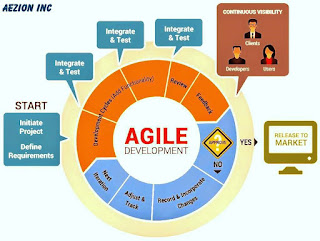
In this post, we will explore some aspects of managing a successful software development project. This includes how to assemble a strong team, tips for effective communication, and considerations for culture fit in your company. Custom Software Development is a totally different approach to develop the software package in numerous methods concerned involved in different steps

1. Project Planning:  Planning is the key issue for the project, analyzing the strengths and weaknesses of the project. Coming up with makes a project a new strategy and effectiveness.

The planning will allow you to create a clear vision and goals for your team and stakeholders and ensure that everyone is aligned in understanding what they're building together.


2. Quality Design: The step of planning takes over, which is largely building the design of the project activity. This step helps take away attainable flaws by setting a regular and making an attempt to stay on the project.

In order for any software development project design to succeed, you need an effective team with complementary skill sets.


 3. Development and Coding: The actual task of developing the software development programming starts here with data recording going on in the background with different step business logic, the user interface logic (UI), and the input logic. Once the software is developed, the stage of implementation comes in where the product goes through a pilot study to see if it’s functioning properly. The coding team moves on to the stage of coding and implementation. Once the development team has the requirement specification and the design documents in hand, the software developers can start programming in  ASP.Net custom development, ASP.Net MVC Development, Share point development, Windows forms development, WPF application development, Microsoft dynamic CRM.ASP.net development may be a server-side internet application development turn out dynamic internet applications and results.ASP.Net MVC development may be a pattern based mostly the tool to style a website clean separation of concern whereas coming up with websites it offers friendly development latest web standards.

4. Testing: The testing stage assesses the software for bugs and documentation errors if there are any.

5. Delivery and Support: Once the software passes through all the stages without any issues, it is to undergo a maintenance process wherein it will be maintained and upgraded from time to time to adapt to changes in project delivery and support.

When teams are developing software, they overlook some really important steps to take when running a software development project successfully. If these steps are not followed carefully, it can lead to big problems later on in the process or even in another project that is being developed at that time. 

Steps in Software Development Project


About Author: Aezion Inc. is a custom software development company in Dallas, Texas. The team is entirely well expertise, and the level of communication and response is incredibly high. We tend to an honored by our client's trust and appearance forward to learning; however, we are able to assist you to win your IT goals.

Choosing the Right Frontend Framework in 2026: What Engineering Leaders Need to Know

In the last three years alone,  front-end  frameworks have improved more than they did in the entire  previous  decade. Faster compilation t...